
"Thanks to Track 2 Pay, we can ensure that all our providers are paid accurately and on time, without any hassle. "
Built for TherapyNotes & group practices
Stop paying providers from a spreadsheet
Track 2 Pay turns your billing exports into accurate provider payouts — and shows every provider exactly what they were paid for. Set your rules once; the engine does the math forever.
Why Track 2 Pay
Paying people on production shouldn't mean a monthly spreadsheet marathon
Export, copy-paste into Excel, hunt for duplicate charges, apply a different rate for each person, hope nobody got double-paid. It's slow, hard to audit, and one formula error costs real money — and real trust.
Track 2 Pay replaces that spreadsheet with a system of record: rules you define once, math that runs the same way every time, and a trail behind every number your providers can follow themselves.
How it works
From billing export to provider payout
Five steps. Set up your rules once, and after that running payroll is a few clicks.
01
Import
Drag a TherapyNotes export — or any billing spreadsheet — onto the page. It's read natively, no column-wrangling.
02
Review
The system de-duplicates automatically and flags anything that needs a human decision, so bad data never reaches a payout.
03
Set rules once
Define how people get paid — “Dr. Lee gets 60% of collections,” “new clinicians get 50%.” Set them once and forget.
04
Run a batch
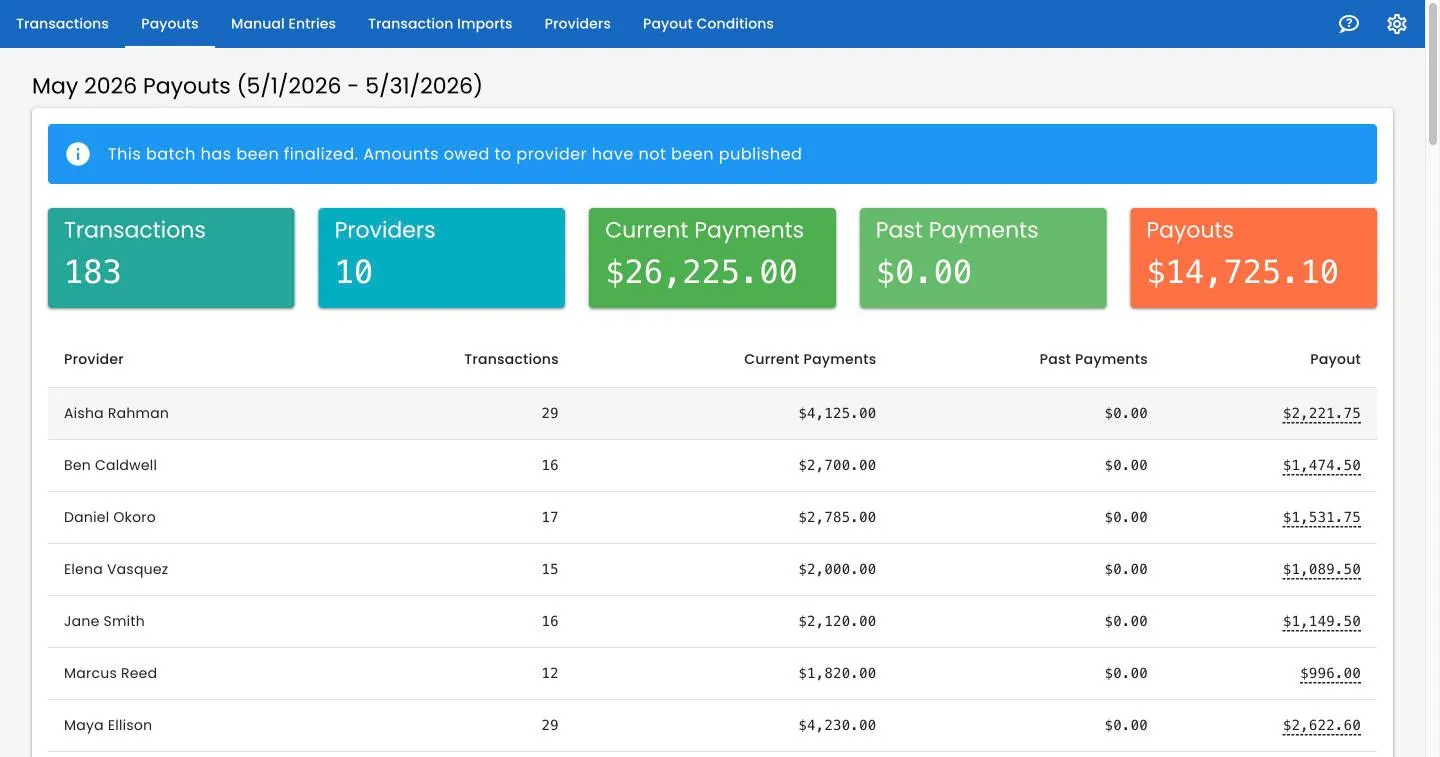
Pick a pay period and Track 2 Pay calculates what every provider is owed, with a live per-provider breakdown.
05
Finalize & publish
Lock the numbers, then optionally publish so each provider sees exactly what they're getting paid — nothing more.
Duplicate detection
Never double-pay a provider again
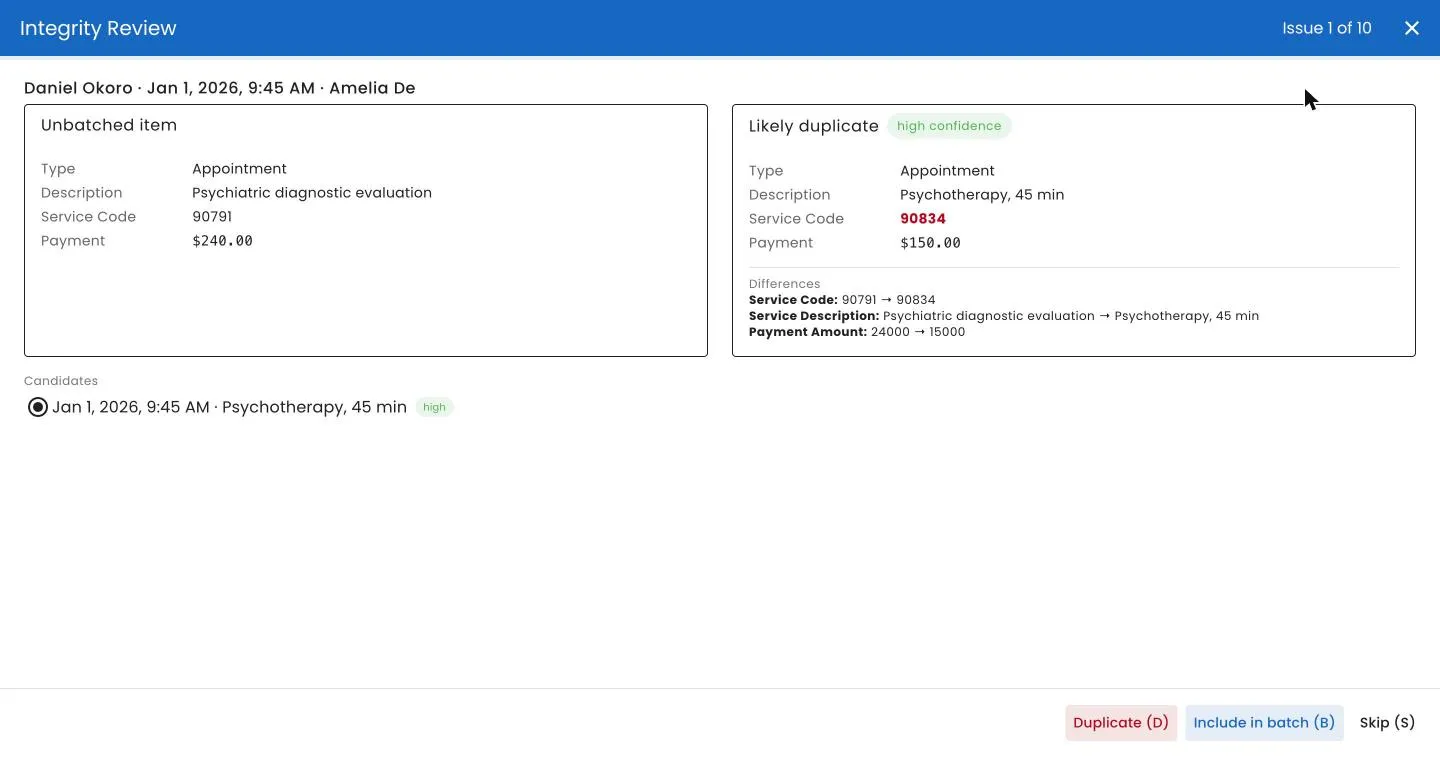
Track 2 Pay flags transactions that fell through the cracks — above all, unbatched items dated inside a period you've already paid — and walks you through them one at a time.
- Confidence-scored, with the changed field shown
- One-click auto-fix for the obviously-safe matches
Transparency for providers
Providers see exactly what they're paid for
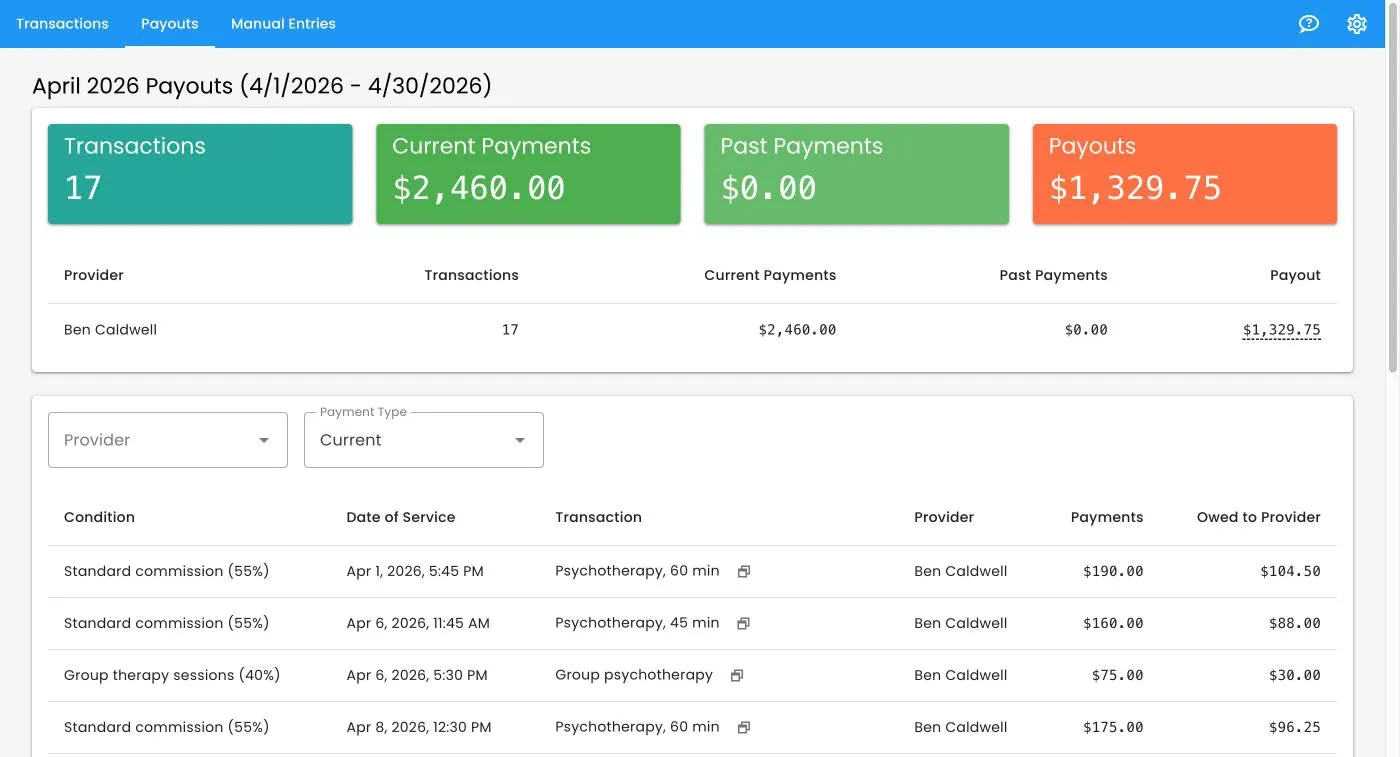
Every provider gets a secure login and an itemized view of their payout: each session, the payment on it, the rate that applied. “Why was I paid this?” stops being a question.
- Read-only, and scoped to them — nobody else's numbers
- Patient and insurance portions tracked separately
“I used to question the accuracy of my paychecks. T2P is so transparent I never have to wonder anymore — it's easy to understand where every session has been paid out.”
Features
A system of record for provider pay
Everything around the payout engine that keeps the numbers accurate, accountable, and easy to trust.
One-click payout batches
Run a pay period in one click — headline totals, a per-provider breakdown, and the rule applied to every line.
Approval workflow
Hand-keyed charges move Draft → Submit → Approve or Reject, with a written reason on every rejection.
Full audit trail
Field-level before/after history across roles, pay rules, and transactions, with timestamps and the person responsible.
Roles & provider self-view
Owner, Editor, and Provider roles, plus multi-account switching for bookkeepers managing several practices.
Bring any billing system
Native TherapyNotes support, plus a generic XLSX importer with custom fields — no engineering work.
Priced by transactions, not seats
You're charged for what you process each month, never per user. Add every provider and billing user you need.
Who it's for
Built for teams that pay people on production
If compensation is a percentage, a split, or a rule applied to a stream of transactions — not a flat salary — Track 2 Pay was built for you.
Group therapy & mental-health practices
The flagship use case — native TherapyNotes support automates the whole payout cycle.
Multi-provider clinics & healthcare groups
Anyone paying practitioners on production or collections, across one location or many.
Bookkeepers & billing companies
Switch between accounts to manage payouts for several practices from one login.
Any services business paying on a cut
If you pay contractors or partners a percentage of billed revenue in a spreadsheet today, this is for you.
Providers & clinicians
A read-only view of what they're owed once a batch is published, with the transactions behind every dollar.
Integrations
Native TherapyNotes, or any billing spreadsheet
Drag in your data and it's reconciled automatically — no manual column-wrangling, no double-counting.

TherapyNotes
Native integration
Track 2 Pay reads the TherapyNotes billing export natively — clinician, patient, service code, insurer, dates, and amounts — and pulls the right rows automatically.
View integrationSpreadsheet import
Any XLSX billing export
Not on TherapyNotes? Map any billing spreadsheet into Track 2 Pay — add your own custom columns, no engineering. Bring your export from SimplePractice or anywhere else.
View integrationRe-importing an updated file updates existing records instead of creating duplicates — so your ledger stays clean. Questions about your data?
HIPAA compliant
Built to handle the patient data that comes with a billing export.
BAA available
We sign a Business Associate Agreement with every practice.
Encrypted end to end
Your data is encrypted in transit and at rest.
Hosted in the US
Customer data stays on US-based infrastructure.
Customer stories
Practice owners, accountants, and providers trust Track 2 Pay
From single-location practices to multi-site groups, teams rely on Track 2 Pay to pay providers accurately and keep everyone on the same page.
Retire the payout spreadsheet
Book a demo and we'll set up a free trial for you — no credit card required. We'll load your data, configure your rules, and run a test batch against a period you've already paid.